Review: S2Pi Aluminum NAS case with Ice Tower cooler
7 March 2026 | 297 views | .zip | 1.7 KB | Blog, Tech notes
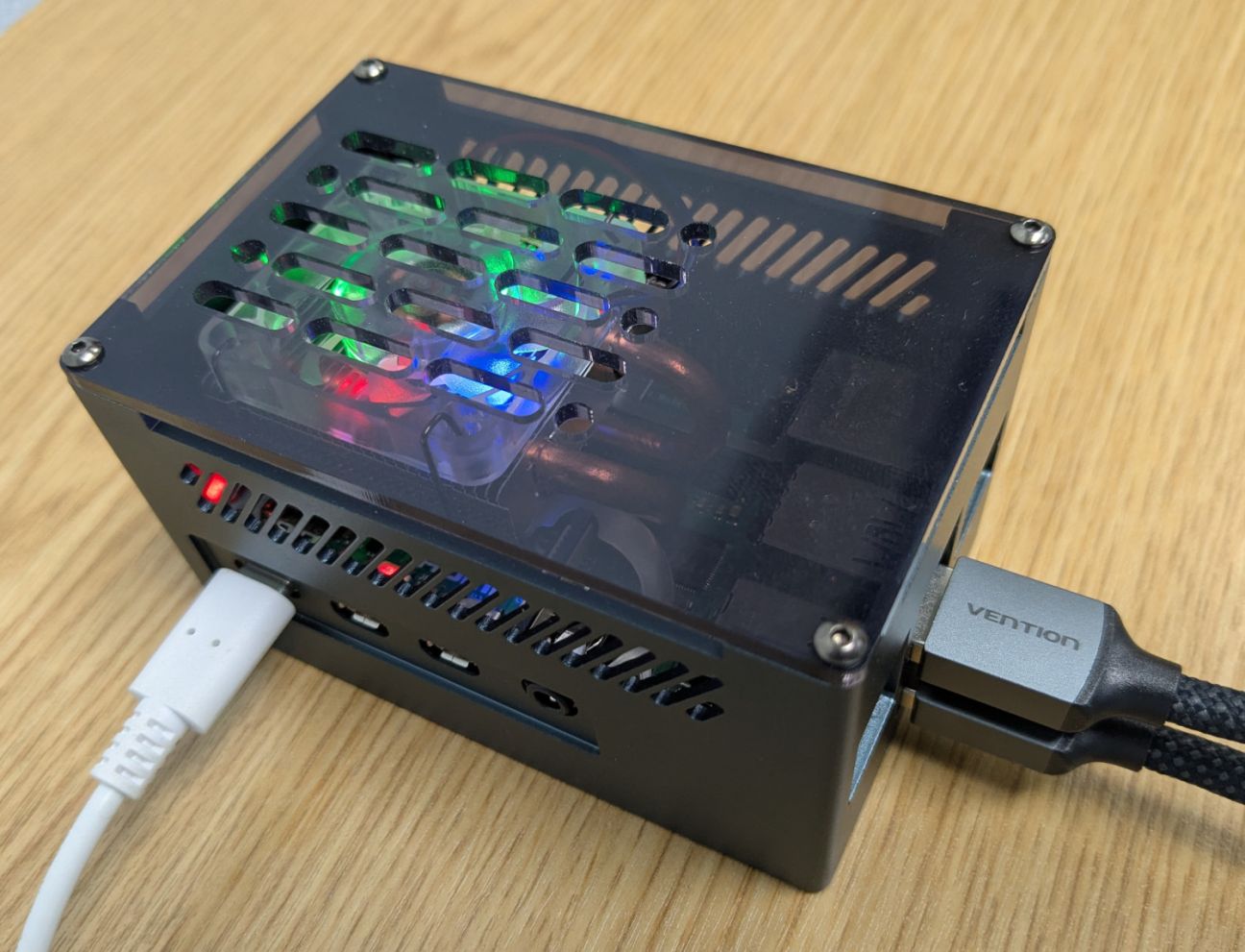
TLDR: Recommended for Raspberry Pi 4b...if you don't have issues with the USB connection to the SSD (I had to replace the connector on one unit with a short USB A-to-A cable). Excellent construction but fan is noisy at high loads; can mitigate with an improved fan control script (provided).
The S2Pi Aluminum NAS case provides a rugged housing for the Raspberry Pi 4b. It comes with a bottom HAT for mounting M.2 SSD storage and an Ice Tower heat sink and fan, for insanely strong cooling performance. It's an excellent package for upgrading your Pi to a lightweight server.
Construction and performance
The body and base of the case are made from 1.5 mm aluminium and rigid. The top is a clear 3 mm thick acrylic plate. All faces of the case have ventilation grills for good airflow. The base has two long rubber strips to minimise vibration.
The M.2 SSD is mounted on a board that attaches underneath the Pi, powered by three pogo pins the make contact with the GPIO of the Pi above. The M.2 connects to the Pi via a double USB-A adapter, so two of the Pi's USB-A ports will be occupied.
The other main feature is the Ice Tower heat sink and fan. It's huge for a Pi, and insanely effective at cooling, your Pi absolutely will not throttle with the Ice Tower blasting away on it, even in the tropical heat. The downside is that the fan is quite noisy at higher speeds, but this can be mitigated using a script to control fan speed via PWM. I have a solution for that below.
The kit thoughtfully contains spare parts including screws, stand off, a spare thermal pad and a screwdriver. Really appreciate that.
Note: Ensure the pogo pin contacts are seated properly on the GPIO pins, and that the brass standoffs connecting the M.2 carrier board to the Pi are fully screwed in! The pogo pins create a little bit of resistance if you are finger tightening the standoffs, which you might think means 'done' if you don't inspect the standoff carefully. A loose connection here will result in boot failure due to inadequate power.
Issues
I encountered three issues with the case.
1. Possible dealbreaker: The USB connection for the SSD is unreliable (fixable)
I've got two units, and on one of them I had a lot of problems with the double USB connector: Seems to work at first, but come back the next day and my Pi is down and won't reboot without reseating the connector. I think the issue is the board spacing. The connector is a tight fit and seems like inserting it breaks the electrical connection with the contacts, it is rigid and maybe the spacing is just not quite right. I replaced it with a known good connector from an Argon One M.2 case and the issue remained. I couldn't get it to work reliably.
To fix it, I bought a short USB A-to-A cable (50 cm was the shortest USB 3 version I could find), and used that to connect the SSD board instead. So far it has worked fine and it was a cheap fix. It's a little ugly having the cable dangling out, but it's in the back and not hard to hide.
2. Mounting screws placed under the rubber footings
The first minor issue is that the screws mounting the Pi onto the bottom of the case are placed under the rubber feet. If you want to remove the Pi or M.2 drive, you will need to take the rubber feet off, which will weaken the glue when you go to put them back on. Having button style feet would have been better.
3. Fan noise (with solution)
The second and more significant issue is the fan noise, which I stress can be fixed. When you first turn the Pi on the fan spins at 100% speed and wow, you wouldn't want that in an office or residence.
You can solve this problem by using a script to adjust the fan speed according to CPU temperature via PWM. The manufacturer provides a Python script to do this in a small use manual, but the code has a few flaws and bugs, and is limited to three speeds.
I used Claude Code to help me create a better one, which you can download below. My version turns the fan completely off when the CPU temperature is low, and then ramps smoothly as temperature rises, with a buffer at the lower threshold to stop the fan oscillating on and off. Under normal use this solves the noise problem, although it will still be a bit loud if the Pi is under heavy load. The fan should never have to run at 100% speed on this hugely oversized cooler.
I found the fan will also ramp back to 100% if the Pi is shutdown via the terminal. This is because the control script stops working (of course) while the 5V GPIO pin continues to supply the fan even while the Pi is off. The solution is to power the fan from the adjacent 3.3V GPIO pin instead, which actually gets turned off during shutdown.
Overall, its a great case, although I did spend a full day debugging it and fixing the noise issue (and the power problem caused by my own ignorance). It is much more practical than the Argon One V2 M.2, which it has replaced. The Argon One got a lot of good reviews, but it has a low quality fan that is poorly mounted in a depression with no airflow channel. I live in the tropics, and the case was uncomfortably hot all the time, even during idle.
For a Pi 4b this is the best SSD/cooling solution I'm aware of. The Pi 5 options are even better...but that will be another article!
Download my improved PWM fan speed controller script below:
Copyright, all rights reserved.